• Home
    • Why Spacedox?
    • About Us
    • Clients
    • Technology
    • Experts Speak
    • Upload Plans
  • Products
    • Spacedox Basic
    • Spacedox Plus>
      • Citizen's Portal only
  • Pricing
    • Paperless Savings Calculator
  • Blogs
  • Support
    • Contact
    • Spacedox 1st time login guide
    • Support Ticket
    • FAQ
    • PDF Utilities
    • Applicant Guides>
      • PDF Upload/Resubmittal tips
      • Brava Reader Guide
      • Applicant Guide to Spacedox
    • Reviewer Guides>
      • Spacedox 1st time login guide
      • Plan intake and outtake>
        • YouSendIt
        • Stamping Files
      • Reviewer's guide to Spacedox
      • Comparing 2 Versions
    • Training Videos
    • Downloads
    • Terms of Service
  • Demo
    • Test Drive Spacedox Signin>
      • Upgrade Offers
  • Sign-In

Applicant guide to using Spacedox

(Reviewed drawings returned from Municipality using Spacedox)
 
You will have received an invitation with a temporary password from Spacedox)


  • You have just received a plan notification email from Spacedox asking you to respond to their latest review.
  • Sign into Spacedox Login Screen URL  http://www.spacedox-live.com/main  and click on the appropriate link in the email and go to the plan.

Click on any image to enlarge


Step #1

Picture
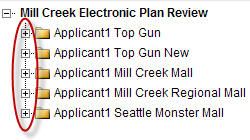
After you have successfully logged into Spacedox a link to your Projects(s) will be displayed.

Step #2

Picture
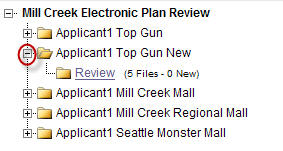
Click on the "+" next to the appropriate project name to see the "Review" folder. This folder holds all the agency reviewed files.


Step #3

Picture
Next, open the Review folder.  NOTE: The folder will be empty until a reviewed file is placed there by the agency.

Step #4

Picture
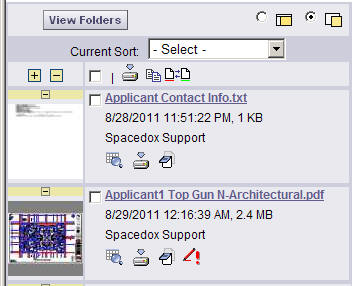
Click on the thumbnail or name of the file you want to see.


Step #5

Picture
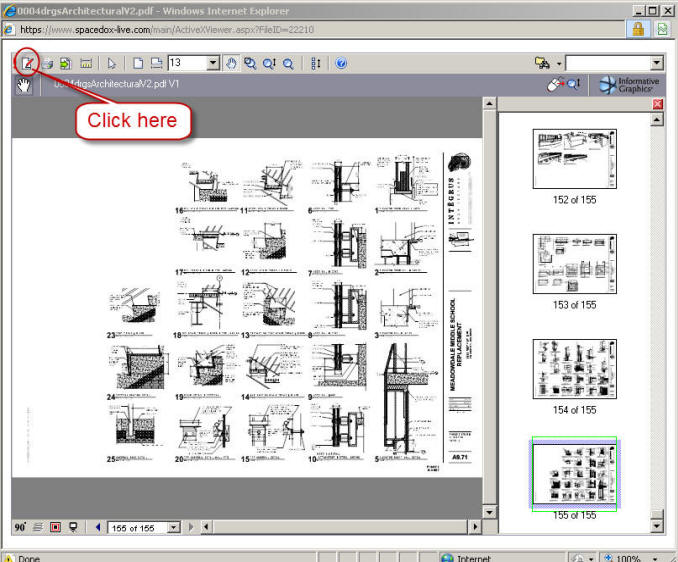
Brava!™ is now launched.  Click on the icon to open the comments and markups.

Step #6

Picture
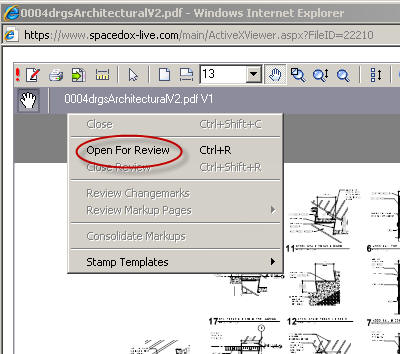
Click on "Open For Review"


Step #7

Picture
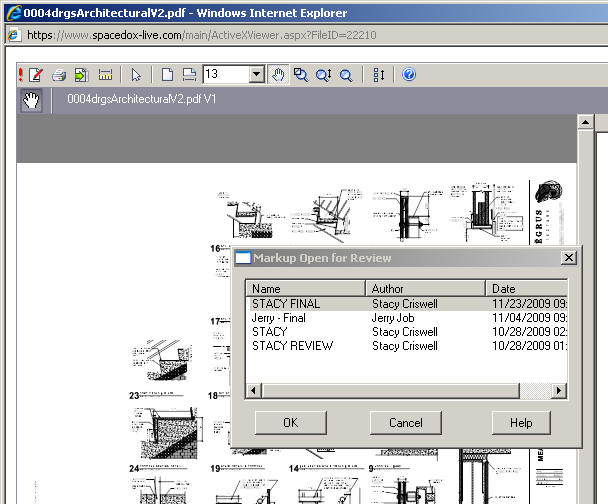
"Markup Open for Review" popup provides a list of all the Markups and Comments in the file.

Step #8

Picture
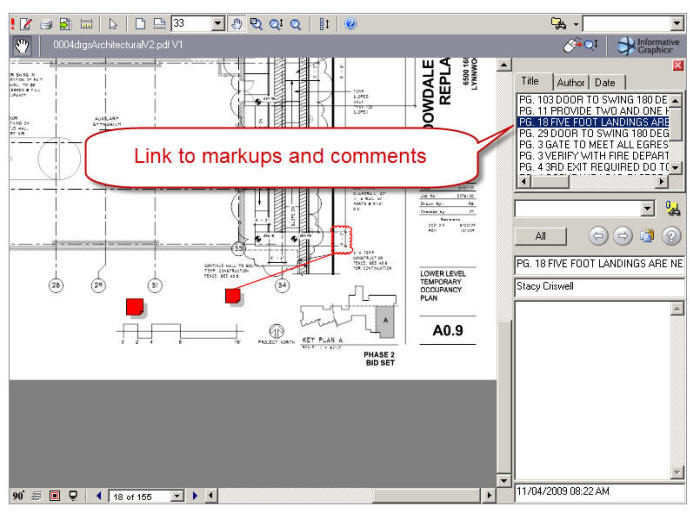
List on the right links to markups and comments.  Search by Title, Author, Date and Keyword.


Products                               

Pricing
Demo
Test Drive
Spacedox Basic
Special Offers
Mobile Inspections


Company                   

Home
About Us
Clients

Contact Us
Blogs
Client Videos
Experts Speak


Support                     

1st time Spacedox login support
Support Ticket
FAQ
Applicant Guides
   PDF Upload Guide
   Spacedox Guide
Reviewer Guides

   Plan intake/outtake directions
      YouSendit
   How to compare two versions
Training Videos

Downloads
Terms of Service
Upload Plans


Picture
© 2004–2013 Spacedox. 
        All rights reserved